Black Friday Offer 2026 Front End
AI ASKS Client Edition
BLACK FRIDAY — STARTING AT $17
Your next branded client handout could be ready in 10 minutes.
At midnight on Monday, 30 November, the Black Friday offer ends and the price moves to $37.
And you won’t have to spend the evening writing it.
If you’re a nutrition coach, you’ll know how much time disappears into creating things for clients. Recipe collections, welcome packs, challenges, program materials. Even a fairly simple handout can turn into a much bigger job than you expected.
AI ASKS Client Edition helps you create those materials without starting from scratch every time.
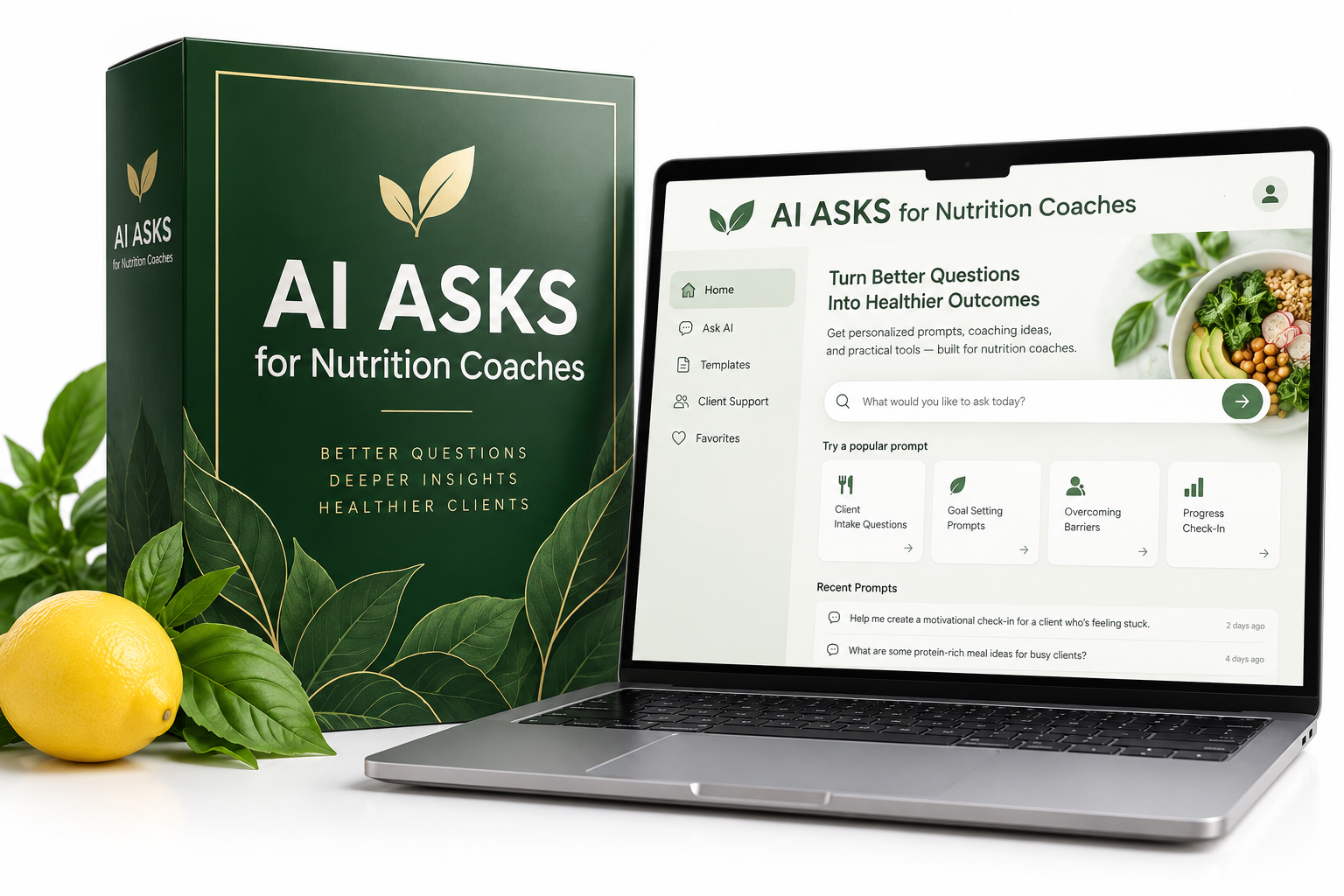
It’s a browser-based app that asks you the right questions, prepares a detailed prompt for ChatGPT or Claude, and turns the finished content into a branded Word document or PDF.
Set up your Coach Profile once with your logo, brand colours, qualifications and writing style. Then choose what you want to create and answer a few questions, by typing or speaking.
You check and approve the plan before anything gets written.
And because you’re creating nutrition content, the prompts include safeguards designed to keep the writing within your professional scope.
Works with free ChatGPT or Claude. No API key and no monthly AI ASKS fee.
[Get AI ASKS Client Edition — Current Black Friday Price]
Includes three bonuses and a 14-day refund under the terms below.
You probably have better things to do than spend your evenings making handouts.
I imagine this will sound familiar.
A client needs a few recipes, so you think you’ll put together a quick handout. Nothing complicated.
But then you’re checking ingredients, working out portions, looking at allergens and trying to make the page look reasonably professional.
An hour goes by. Then another.
Or perhaps you’re putting together a new onboarding pack. You’ve written welcome letters and first-week instructions before, but this one needs to reflect your current program, so you’re back in the document changing things again.
And that workshop you’ve been meaning to run? It’s still sitting in your notebook because turning the idea into lessons, worksheets and emails feels like a whole project in itself.
None of this is especially difficult. It’s just time-consuming.
You know what you want to say. You know your clients and how you work. Getting it all written, organised and looking right is the part that eats into your day.
Perhaps you’ve already tried using ChatGPT to speed things up.
Sometimes it’s brilliant. Other times it gives you something so generic that you end up rewriting most of it.
It might use language you would never use with a client, ignore your coaching approach or make a nutrition claim that needs correcting.
So much for saving time.
That’s why I created AI ASKS.
I wanted a way to give AI the information it needed before it started writing, rather than spending ages trying to fix the result afterwards.
AI ASKS works out what to ask, so you don’t have to.
You don’t need to know anything about writing AI prompts.
First, tell it what you’re making.
Choose the kind of material you need. It could be a recipe handout, an onboarding pack, a challenge, a coaching program or a webinar.
AI ASKS asks you a series of questions, one at a time.
You can type or speak your answers. If a question isn’t relevant, skip it. If you change your mind, go back. You can also pause and return later.
Because you’ve already entered your business details into your Coach Profile, the app won’t keep asking you for things it already knows.
Then have a look at the plan.
Before you send anything to ChatGPT or Claude, AI ASKS puts your answers into a one-page plan.
It shows who the material is for, what it should cover, the approach you want to take and any important boundaries.
Read through it and change anything that doesn’t look quite right.
It’s much easier to correct a plan than to rewrite a finished document.
Once you’re happy, approve it.
Finally, let AI do the writing.
AI ASKS prepares a prompt using everything you’ve agreed.
Copy it into ChatGPT or Claude and let the AI generate the content. Then paste that content back into AI ASKS.
The app formats it with your logo and brand colours, ready for you to check and download as a Word document or PDF.
Your approved plans are saved too, so if you want to make something similar next week, you can duplicate a plan rather than go through everything again.
Have a go. You can try the recipe interview here.
I think it’s much easier to understand AI ASKS when you actually use it.
So I’ve included a live demonstration on this page.
Try creating a recipe handout. Answer the questions as you would in the full app, either by typing or speaking, and you’ll see how your answers become a plan.
You’ll also see a sample recipe handout created from your answers, with allergen information and estimated nutrition for each recipe.
The demo creates four recipes. In the full version, you can ask for as many as you need.
[EMBED LIVE RECIPE DEMO]
Nothing you type or say in the demo is saved.
If you’d rather watch how it works first, there’s also a short video showing the process from the first question to a finished branded handout.
[EMBED TWO-MINUTE DEMO VIDEO]
[Get AI ASKS Client Edition — Current Black Friday Price]
What can you make with it?
I’ve kept the Client Edition focused on five things nutrition coaches often need.
You won’t have to work your way through dozens of tools and features just to find the one that’s useful. Choose the job you want to do and AI ASKS takes you through the questions.
Recipe handouts
[IMAGE: Example branded recipe collection]
This is probably one of the quickest ways to see how useful the app can be.
You might need a few breakfast ideas for one client, a set of family meals for another, or a whole collection to go alongside a coaching program.
Tell AI ASKS what you’re looking for, how many recipes you need and any dietary requirements.
Each recipe comes with estimated nutrition and flags for the nine major US allergens: milk, eggs, fish, shellfish, tree nuts, peanuts, wheat, soy and sesame.
You can also include shopping lists, preparation tips, ingredient swaps and storage suggestions.
The nutrition estimates and allergen information still need checking, particularly where a client has an allergy. But you’re not starting with an empty page.
Client onboarding
[IMAGE: Branded welcome pack]
A good welcome pack can make a new client feel much more comfortable about getting started.
It also saves you from answering the same practical questions over and over.
AI ASKS can help you create welcome letters, intake forms, first-week guides and FAQs.
You decide what clients need to know and how you want to communicate with them. The app helps you put it into a clear, organised document that looks like it came from your business.
Health-related questions are also covered by the prompt safeguards, so the content is instructed to stay within your scope.
Challenges and workshops
[IMAGE: Five-day challenge workbook]
You know those ideas that sound brilliant when you first think of them?
A five-day challenge. A short workshop. Something your clients have been asking about for months.
Then you sit down to create it and realise how much is involved.
AI ASKS helps you plan the daily content, lessons, worksheets and emails, along with promotional posts if you need them.
You still decide what you’re teaching and what people should take away from it. The app helps you build the materials around that idea.
Coaching offers and programs
[IMAGE: Coaching program outline]
Putting together a new coaching offer can be surprisingly awkward.
You know how you want to help people, but explaining exactly what’s included, how the program works and why you’ve priced it a certain way isn’t always easy.
AI ASKS can help you organise the offer, build a program outline and draft your pricing page.
It can also help you work through the pricing calculations.
The decisions are yours. This gives you a more structured starting point.
Webinars
[IMAGE: Webinar script and slide outline]
If you’ve ever planned a webinar, you’ll know the presentation is only part of it.
You need an outline, a script or speaking notes, slide content, a registration page and reminder emails.
AI ASKS helps you prepare all of those pieces around your topic and the people you’re speaking to.
That leaves you more time to think about what you want to teach and less time assembling all the documents that go with it.
Your business details stay with your work.
One of the things that frustrates me about using AI is having to explain the same information again and again.
Your writing style. Your audience. The way you approach nutrition. The words you prefer not to use.
That’s why AI ASKS has a Coach Profile.
You enter your name, practice details, qualifications, approach, writing style, logo and brand colours once. The app uses that information when it prepares future plans and prompts.
You can choose the spelling, units and currency that suit your clients, including conventions used in the UK, US, Canada and Australia.
There’s support for different dietary preferences too, including vegetarian, vegan, gluten-free, dairy-free, halal, kosher, Ayurvedic and blood-type-based approaches. Supporting an approach as a content preference doesn’t mean endorsing its scientific claims.
And you don’t have to sit typing every answer. If it’s easier to explain what you mean aloud, you can use voice input.
When you’ve finished a project, you can download the branded result as Word or PDF.
Your plans can be saved, reused or duplicated, and there’s no limit imposed by AI ASKS on how many projects you create. Any limits on your ChatGPT or Claude account will still apply.
It’s designed to take away some of the little jobs that add up when you’re running a coaching business.
Why I built nutrition safeguards into AI ASKS
I’m Catherine Ford. I hold five nutrition diplomas and write for the wellness industry.
I’ve spent a lot of time working with nutrition content, and I know how easy it is for wording to go a little too far.
Something might sound perfectly reasonable, but when you look closely, it’s making a promise the evidence doesn’t support. Or it’s straying into advice that really ought to come from a qualified medical professional.
AI has made that problem more noticeable.
It can produce beautifully written content in seconds, but that doesn’t mean everything in it is correct.
And when your name is going on a document that a client might rely on, those details matter.
I didn’t want AI ASKS to be another tool that simply generates a lot of text and leaves you to untangle it.
So I built safeguards into the prompts it creates.
They’re not a replacement for your own knowledge or professional judgement. They are there to help you get a more appropriate first draft.
For example, the prompts instruct AI to stay within the qualifications you enter, without diagnosing or claiming to treat or cure health conditions.
They also tell AI not to invent research, statistics, testimonials or client results.
Nutrition and health claims are marked [Verify before publishing], so you can see what needs checking.
If you work from a weight-neutral approach, the prompts respect that. They avoid calorie, weighing and weight-loss language, and discourage describing foods as good or bad.
There’s additional caution around children, pregnancy, older adults, medical conditions and eating disorder recovery.
Recipes include allergen flags, and prompts are written to avoid including personal client names, contact information or health details in finished work.
The AI is also instructed to check what it’s created against your approved plan and tell you which requirements it believes it has met.
That last check isn’t foolproof. Neither are the others.
You’ll still need to review the finished work, verify nutrition information and make sure it’s appropriate for the people you’re working with.
But having those boundaries included from the beginning is a much better place to start than hoping a generic AI prompt will get everything right.
I’ve also included three bonuses.
I wanted you to be able to use AI ASKS straight away, rather than buy it and then spend the next few weeks wondering what to create first.
So there are three extras included with the Black Friday offer.
Bonus 1: New Year Reset Brief Pack — Value $47
January can be a busy month for nutrition coaches.
People are thinking about changing routines, planning meals and finding ways to make healthier habits more manageable.
This pack gives you five ready-made January plans to use with AI ASKS.
You can adapt them to your own coaching style and clients, rather than putting every brief together from scratch.
Bonus 2: Live Implementation Day, 1 December — Value $97
I’ll be running a live online session where you can see AI ASKS used on real coaching tasks.
You’ll be able to watch the process, see how the different parts work together and ask questions.
If you can’t attend live, you’ll still get the replay and implementation checklist. They’re included for everyone who buys.
Bonus 3: Guardrail Cheat Sheet — Value $27
This is a one-page reference to help you spot nutrition and health claims that need extra care.
It’s the sort of thing you can keep beside you when checking a handout or reviewing content before sharing it with clients.
It doesn’t replace professional guidance, but it’s a useful reminder of where the boundaries are.
So what’s included for the Black Friday price?
You’re getting AI ASKS Client Edition itself, which has a stated value of $97, together with all three bonuses.
The New Year Reset Brief Pack is valued at $47, Live Implementation Day at $97, and the Guardrail Cheat Sheet at $27.
That brings the total stated value to $268.
But you won’t pay that today.
The Black Friday price starts at $17.
[DISPLAY LIVE CURRENT PRICE]
This is a dime sale, so the price increases in small steps as sales come in.
At midnight on Monday, 30 November, the Black Friday promotion finishes and the price moves to $37.
If you’re considering getting it, buying earlier in the promotion means you may pay less.
[COUNTDOWN TIMER TO MIDNIGHT 30 NOVEMBER]
[Get AI ASKS Client Edition at the Current Price]
You get the app, all three bonuses and a 14-day refund under the terms below.
What if you buy it and it isn’t for you?
You have 14 days to use AI ASKS and see whether it suits the way you work.
If it doesn’t work for you, you can request a refund within 14 days of purchase.
Email catherine@catherinefordproducts.com with your order ID, a screenshot showing that you’ve used the app and a short explanation of what didn’t work.
That’s the refund policy.
Your purchase also comes with a personal-use license for one coach. You can create as many resources as you like for your own clients, but the app and bonuses can’t be resold, shared or given away.
A few things you might be wondering
Do I need to pay for ChatGPT or Claude?
No. You can use a free account with either service.
AI ASKS prepares the prompt, and ChatGPT or Claude creates the content. You’ll then paste that content back into AI ASKS for formatting.
Is the AI built into the app?
No, it’s a separate step.
I chose this approach so you wouldn’t need an API key or an ongoing AI ASKS subscription.
You use your own AI account and copy the content between the two.
Do I need to install anything?
No. AI ASKS runs in your computer’s web browser.
Where is my work saved?
Your Coach Profile and saved plans are stored in your browser, rather than in an online account.
There’s a Download backup option so you can keep a copy or move your information to another computer.
Can I make marketing materials with it?
The Client Edition covers the five jobs described on this page: recipes, onboarding, challenges and workshops, coaching offers and programs, and webinars.
If you also want tools for marketing jobs such as lead magnets and emails, there’s an optional upgrade available after purchase.
I’m not a registered dietitian. Can I use it?
Yes. You enter your qualifications and coaching approach, and the app creates prompts with instructions to stay within those boundaries.
You’ll still need to make sure the finished content is appropriate for your qualifications and the rules where you practise.
How accurate are the nutrition figures?
They’re estimates generated by AI, not independently verified nutrition calculations.
You’ll need to check them, along with ingredient and allergen information, before giving recipes to clients.
Can I create materials for different clients?
Yes. There’s no limit imposed by AI ASKS on the number of clients or projects.
You can also duplicate approved plans to save time when creating similar materials.
What if I change computers?
Use the Download backup option to keep a copy of your saved information and transfer it.
What if I decide it isn’t right for me?
There’s a 14-day refund policy, provided you follow the conditions described above.
Imagine getting that next handout finished without losing your evening.
You know that document you’ve been putting off?
The recipe collection a client asked about. The onboarding pack that could do with updating. The workshop idea you keep meaning to turn into something real.
It’s probably not that you don’t know what to put in it.
You just need the time to sit down, write it, organise it and make it look presentable.
And there always seems to be something more urgent.
That’s the bit I wanted AI ASKS to help with.
You open the app, answer a few questions and approve a plan. Then you let ChatGPT or Claude do the first draft, bring the content back into AI ASKS and format it in your own branding.
You check the details, make any changes you want and download it.
It won’t do your coaching for you, and it certainly doesn’t replace your expertise.
But it can take a good chunk of the repetitive writing and formatting off your hands.
Which means you can spend more of your time doing the work you actually became a coach to do.
AI ASKS Client Edition starts at $17 for Black Friday, with the price increasing every few sales.
At midnight on Monday, 30 November, the price moves to $37.
[COUNTDOWN TIMER]
[Get AI ASKS Client Edition at the Current Black Friday Price]
Includes three bonuses, works with free ChatGPT or Claude accounts, and comes with a 14-day refund under the stated terms.
AI ASKS for Nutrition Coaches
Created by Catherine Ford Products
catherinefordproducts.com
Support: catherine@catherinefordproducts.co